
How to Watch Peacock TV in Canada [Guide]


Wish you could stream Peacock Originals like “The Miniature Wife“ catch up on “Yellowstone“, or watch exclusive Premier League matches, only to be blocked because you’re in Canada?
It’s a frustratingly common problem for streaming fans. Due to content licensing deals, NBC’s fantastic streaming service, Peacock TV, is not officially available north of the border.
But by using a VPN or smart DNS, you can easily access Peacock TV from anywhere in Canada.
Here, I’ll cover how to choose the right tool, install it on any device, and even solve the tricky US payment requirement that I used personally to access Peacock TV in Canada.
Key Takeaways:
- Peacock TV is not available in Canada due to a content licensing and content distribution agreement with Corus Entertainment.
- Though due to an agreement between Corus and NBCUniversal, you can watch some Peacock Originals on STACKTV and W Network, you still need Peacock TV access in Canada if you want to enjoy the entire library.
- If you are in Canada or traveling there, you can only access Peacock with a reliable streaming VPN or Smart DNS. Otherwise, it will block your access by showing a geolocation error.
- Based on my extensive testing, I found ExpressVPN, NordVPN, and Surfshark reliably unblock Peacock TV in Canada without any buffering and video-quality issues.
- Peacock TV no longer offers a free plan, and you have to pay for the subscription.
- If you don’t have an American payment method, you can use a US Apple and Google gift card or a US virtual prepaid card to pay for Peacock TV from Canada.
- Peacock TV offers official gift cards, but to purchase them, you still require an American credit/debit card (Visa, Mastercard, American Express, etc.) or a PayPal account that is linked to US bank and address.
- You can also ask your friend or family members who live in the USA to get you Peacock TV gift card and use it for subscription.
- Canadians can also download Peacock TV app on their preferred devices including iPhone/iPad, Android smartphones/tablets, Android TV and Amazon Firestick/Fire TV by changing their App store or account location from Canada to the USA.
- If you still can’t access Peacock TV in Canada with a VPN, try connecting to different US servers, clear data and cache, or turn off your device location.
- Using a VPN is 100% legal in Canada to access your favourite streaming platform or to secure your online activities.
How to Access Peacock TV in Canada [4 Quick Steps]
Can you get Peacock in Canada? Here’s how to watch Peacock TV in Canada by using a VPN:
- Download and subscribe to a reliable streaming VPN—I highly recommend ExpressVPN (offering 73% off plus 3 months free and a risk-free 30-day money-back guarantee).
- Open the VPN app, sign in, and connect to the US server. I have tested Miami, Washington, Dallas, and New York servers, and they all work like a charm.
- Head to Peacock TV, sign in or sign up using a US gift card or virtual cards (more details in next section).
- Once you’re subscribed to Peacock TV, start watching your favorite shows, movies, or live sports from Canada.
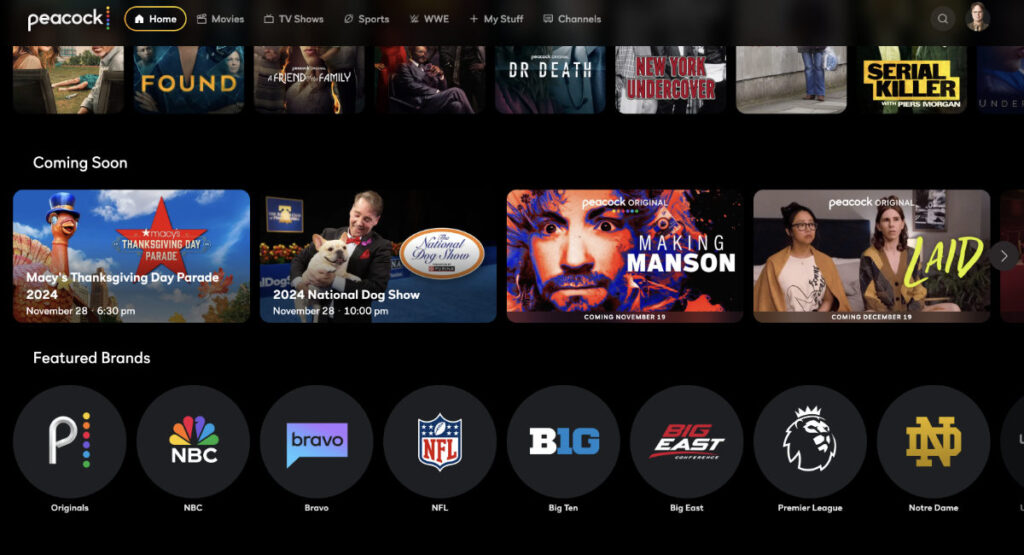
What is Peacock TV? – Everything you need to know!
Peacock is NBCUniversal’s flagship streaming service, launched in July 2020. Named after the NBC peacock logo, it’s one of the largest streaming libraries in the US, offering a mix of live TV, on-demand content, and exclusive Peacock Originals all in one place.
Here’s what makes Peacock stand out from the streaming crowd:
- NBC’s full back catalog: Every season of The Office, Parks and Recreation, 30 Rock, Brooklyn Nine-Nine, and more
- Peacock Originals: Exclusive series like Poker Face, Bel-Air, Love Island USA, and The Traitors US that you can’t watch anywhere else
- Live sports: English Premier League, Sunday Night Football, WWE, Big Ten sports, IndyCar, and golf
- Universal film library: Blockbusters including Oppenheimer, Jurassic Park, The Super Mario Bros. Movie, and Knives Out
- Next-day NBC content: Episodes of current NBC shows like Law & Order and Chicago Med available the day after broadcast
- Live news: 24/7 NBC News Now live stream included in all plans
Peacock operates on two paid tiers; Premium ($7.99 USD/month with ads) and Premium Plus ($13.99 USD/month, ad-free). The old free tier was discontinued; all current access requires a paid subscription.
Why is Peacock TV not available in Canada without a VPN or Smart DNS?
Peacock is blocked in Canada for one specific reason: NBCUniversal signed a long-term exclusive content licensing deal with Corus Entertainment in June 2020.
The same month Peacock launched in the US. Under this deal, Corus has the exclusive Canadian rights to NBCUniversal’s content library.
This means that:
- Corus-owned channels (Global TV, W Network, Showcase, StackTV) are the official Canadian home for NBC and Universal content
- Peacock Originals like Poker Face and Bel-Air air on Corus platforms in Canada rather than Peacock directly
- NBCUniversal cannot legally stream Peacock to Canadian IP addresses without violating its contract with Corus
The Corus deal is a multi-year agreement with no confirmed end date, meaning Peacock’s official Canadian launch is not on the horizon.
Until that changes, a VPN remains the only way to access the full Peacock library from Canada.
And not only Peacock, but you can also access other US-based streaming services like HBO Max, Hulu, and Sling TV in Canada.
Note: Some Peacock Originals are available in Canada through StackTV (via Amazon Prime Video) or on Global TV, but only specific licensed titles, not Peacock’s full catalog. A VPN gives you unrestricted access to everything.
Best VPN for Streaming Peacock TV in Canada?
Based on my testing, the top 3 VPNs for reliably accessing Peacock TV in Canada are ExpressVPN, NordVPN, and Surfshark.
The reason these VPNs top the list is due to their blazing-fast servers for streaming; they unblock Peacock TV smoothly without any video-quality or buffering issues, plus all come with a risk-free 30-day money-back guarantee.
Here are our top 3 recommended VPNs for watching Peacock TV in Canada, broken down by what they do best.
1. ExpressVPN – Best Overall VPN for Streaming
If you’re looking for the most reliable and hassle-free option, ExpressVPN is our top choice. It’s known for its blazing-fast speeds, which are perfect for streaming in high-definition without annoying buffering.
With a massive network of servers in over 20 US locations, you’ll always find a connection that works with Peacock TV.
While it’s a premium option, its performance and ease of use make it worth the investment for serious streamers.
- Key Features: Industry-leading speeds, strong unblocking capabilities, user-friendly apps for all devices, and 24/7 customer support.
- Best For: Users who want the best possible performance and are willing to pay a little extra for reliability.
2. NordVPN – Best for Security and Speed
NordVPN offers a powerful combination of speed and security.
It has over 1,900 servers in the US alone, so you have plenty of options for unblocking Peacock TV.
Its proprietary NordLynx protocol ensures you get fast connections for a smooth streaming experience.
Plus, with added security features like Threat Protection, you get more than just a streaming tool; you get a complete online security suite.
- Key Features: Huge US server network, fast NordLynx protocol, strong security features, and a 30-day money-back guarantee.
- Best For: Users who want a fast, secure VPN that offers a great all-around value.
3. Surfshark – Best Budget-Friendly Option
For those looking for a great deal without sacrificing quality, Surfshark is the perfect choice.
It’s one of the few top-tier VPNs that allows unlimited simultaneous connections, meaning you can use it on every device in your household with just one account.
It reliably unblocks Peacock TV and offers solid speeds for streaming. It’s an incredible value for the price.
- Key Features: Unlimited device connections, very affordable pricing, reliable unblocking, and a clean, easy-to-use interface.
- Best For: Families, students, or anyone on a budget who needs to connect a large number of devices.
Quick Comparison of Top VPNs for Peacock TV:
| Feature | ExpressVPN | NordVPN | Surfshark |
|---|---|---|---|
| Best For | Overall Performance | Security & Speed | Budget & Multiple Devices |
| US Servers | 1600+ | 1970+ | 600+ |
| Avg. Speed | Excellent | Excellent | Good |
| Simultaneous Connections | 8 | 10 | Unlimited |
| Money-Back Guarantee | 30 Days | 30 Days | 30 Days |
| Exclusive Deal | Get Exclusive Deal | Get Exclusive Deal | Get Exclusive Deal |
How to Pay for Peacock TV from Canada: Your Step-by-Step Guide
To pay for a Peacock TV subscription from Canada, you can either use a US App Store gift card or a virtual US payment card service.
I have used the following methods to pay for Peacock TV from Canada:
Method 1: The App Store Gift Card Method (Easiest)
This method lets you pay for Peacock using gift cards without needing a US credit card – it’s the simplest option for most Canadians.
- Buy a US Gift Card: Purchase a US Apple or Google Play gift card from an online retailer like Amazon.com or Dundle.
- Set Your App Store to US: Follow the device steps above to ensure your store region is set to the United States.
- Redeem the Gift Card: In your App Store or Play Store account settings, redeem the gift card code to add the funds to your balance.
- Subscribe in the Peacock App: Open the Peacock TV app and sign up. Your gift card balance will be used for payment automatically.
Method 2: The Virtual US Payment Card Method
For a more permanent solution, use a service like StatesCard.
These services provide you with a virtual US credit card number and a US billing address that you can use to subscribe directly on the Peacock TV website.
Method 3: Ask Your Friend/Family for Peacock TV Gift Card
Although Peacock TV is now offering a gift card on their official website, but to purchase it, you still need an American payment method.
In this situation, you can ask your friend or family members who live in the USA, to purchase Peacock TV gift card for you, and you can pay them through online bank transfer.
How Much Is Peacock TV in Canada?
Peacock TV offers three subscription plans (via U.S. pricing, converted approx. to CAD):
| Plan | Features | Monthly (USD) | Monthly (CAD) | Annual (USD) | Annual (CAD) |
|---|---|---|---|---|---|
| Select | TV Favorites from NBC, Bravo & More — with ads | $7.99/mo + VPN cost | CA$11.11/mo + VPN cost | $79.99/yr + VPN cost | CA$111.19/yr + VPN cost |
| Premium ⭐ Most Popular | TV Favorites + Live Sports & Events + Hit Films & Peacock Originals — with ads | $10.99/mo + VPN cost | CA$15.28/mo + VPN cost | $109.99/yr + VPN cost | CA$152.89/yr + VPN cost |
| Premium Plus | Everything in Premium + No Ads (limited exclusions) + Downloads — offline viewing | $16.99/mo + VPN cost | CA$23.62/mo + VPN cost | $169.99/yr | CA$236.29/yr + VPN cost |
Note: Peacock TV Canada price may vary based on U.S. subscription rates and currency conversion, since the service isn’t officially available in Canada. If you experience any problem, you can easily cancel your Peacock subscription.
How to Download the Peacock TV App on My Device in Canada?
You can stream Peacock TV on your desktop/laptop, Amazon Firestick, iOS device, or Android device by following these steps for each.
However, since Peacock TV isn’t in the Canadian app stores, you have to guide your device to the US store first.
Follow these steps to watch Peacock TV in Canada on your preferred devices:
On Your Desktop or Laptop (Windows and macOS)
Desktop streaming is the simplest method, requiring only a VPN connection to access Peacock’s website directly through your browser.
Follow these steps to watch Peacock TV on your PC/laptop in Canada:
- Install Your VPN: Download and install your chosen VPN from its official website.
- Connect to a US Server: Open the VPN app and connect to any server located in the United States.
- Go to the Website: Open your web browser and go directly to the Peacock TV website (www.peacocktv.com).
- Sign Up or Log In: Click the sign-in button to create a new account or log in to your existing one.
- Start Streaming: You can now watch anything in the Peacock library directly from your browser.
On Your Amazon Firestick or Fire TV
To stream Peacock on Firestick, you’ll need to change your Amazon account region to the US and install the app from the American store.
Here’s how you can watch Peacock TV in Canada on Amazon Firestick or Fire TV:
- Connect Your VPN: On your Firestick, install your VPN app from the search menu, open it, and connect to a US server.
- Change Your Amazon Region: On a computer, go to Amazon.ca. Navigate to “Accounts & Lists” -> “Manage Your Content and Devices” -> “Preferences.” Change your country/region to a valid US address.
- Restart Your Firestick: Unplug your Firestick from power for a minute and plug it back in.
- Download Peacock TV: Use the search function on your Firestick to find and install the “Peacock TV” app.
- Log In and Watch: Open the Peacock TV app, sign in, and you’re ready to stream.
On Your iPhone or iPad
iOS users must temporarily switch their App Store region to the United States to download the Peacock app, which can be done through your Apple ID settings.
Here’s how to watch Peacock TV on iPhone/iPad in Canada:
- Connect Your VPN: Open your VPN app and connect to a server in the US.
- Change App Store Region: Go to “Settings” -> [Your Name] -> “Media & Purchases” -> “View Account”. Change your Country/Region to the United States. You may need to select “None” for the payment method.
- Download the App: Open the App Store, search for “Peacock TV,” and download it.
- Stream Away: Open the Peacock app, log in, and enjoy!
On Your Android Phone or Tablet
Android users can access Peacock by changing their Play Store country to the US, though Google only allows this change once per year.
Follow these steps to watch Peacock TV on Android smartphones/tablets in Canada:
- Connect Your VPN: Open your VPN app and connect to a US-based server.
- Change Play Store Region: In the Google Play Store, go to “Settings” -> “General” -> “Account and device preferences.” You should see an option to “Switch to the United States Play Store.”
- Confirm the Change: You may need to add a US payment method to confirm. Note: Google only allows you to change your Play Store country once per year.
- Download Peacock TV: Search for and install the Peacock TV app.
- Log In and Watch: Open the app and sign in.
How can I watch Peacock TV on Roku in Canada?
Watching Peacock TV on a Roku in Canada requires a few extra steps because of geo-restrictions, but it is definitely achievable. The main challenge is that Roku devices don’t have built-in VPN support, so you’ll need to use a workaround to change your virtual location to the United States.
Here’s a detailed, step-by-step guide to get you streaming:
Step 1: Get a VPN with Smart DNS
First and foremost, you’ll need a reliable VPN service that offers a Smart DNS feature. I have tested ExpressVPN’s smart DNS feature called MediaStreamer (included in subscription).
- Why MediaStreamer? This feature is designed specifically for devices like Roku that don’t support VPN apps. It changes your device’s virtual location without the complex setup of a full VPN on your router, making it the ideal choice for streaming.
- Benefits: It provides the fast speeds needed for smooth, buffer-free streaming and is much simpler to configure than the other methods.
Step 2: Set Up a U.S. Roku Account
The Peacock TV app is only available in the U.S. Roku Channel Store. To access it, you’ll need a Roku account that is registered to a U.S. address.
- Connect to your VPN: On your computer or smartphone, connect to a U.S. server using your ExpressVPN app.
- Create a new Roku account: Go to the Roku website and create a brand new account. Be sure to use a different email address than any existing Canadian Roku account you may have.
- Use a U.S. address: When prompted for a location, provide a valid U.S. address and zip code. You can find these using online tools or map services. For payment information, you can often link a PayPal account without issue.
Step 3: Configure Your Network to Use MediaStreamer
This is the most important step. Instead of configuring a full VPN on your router, you will use the much simpler MediaStreamer DNS settings.
- Register your IP Address: Log in to your ExpressVPN account on their website. In the settings dashboard, find the “DNS Settings” or “MediaStreamer” section and click “Register my IP address.” This tells ExpressVPN that your network is authorized to use the service.
- Get Your MediaStreamer DNS Addresses: After registering your IP, ExpressVPN will show you two MediaStreamer DNS server addresses. Keep these handy.
- Enter DNS Addresses in Your Router: Log in to your Wi-Fi router’s administration panel (usually by typing 192.168.1.1 or a similar address into your browser). Find the DNS settings and manually enter the two MediaStreamer DNS addresses you got from ExpressVPN. Save and restart your router.
Now, any device connected to your Wi-Fi router, including your Roku, will automatically use the MediaStreamer DNS and appear to be in the U.S.
Step 4: Factory Reset Your Roku Device
To link your Roku to your new U.S. account, you will need to perform a factory reset.
- On your Roku, go to Settings > System > Advanced system settings > Factory reset.
- Follow the on-screen instructions to reset your device.
Step 5: Set Up Your Roku and Download Peacock TV
This final step completes your Roku configuration, allowing you to access and install Peacock TV from the U.S. Channel Store.
- Connect to your Wi-Fi: During the setup process, connect your Roku to your regular Wi-Fi network, which is now configured with MediaStreamer.
- Log in with your new U.S. Roku account.
- Search for Peacock TV: Once setup is complete, go to the Roku Channel Store and search for “Peacock.”
- Add the channel: Select “Add Channel” to install the Peacock TV app on your Roku.
Once installed, you can open the Peacock TV app, sign in with your Peacock account, and start streaming all of its content directly on your Roku in Canada.
How can I watch Peacock TV in Canada on my TV using Chromecast?
Yes, you can watch Peacock TV in Canada on your TV using Chromecast with your preferred devices, including smartphones, tablets, laptop/PC etc.
Follow these steps to watch Peacock TV in Canada on TV using Chromecast:
Laptop/PC
Here’s how to watch Peacock TV using Chromecast in Canada via laptop/PC:
- First connect to the US server using your preferred VPN.
- Now, open the Chrome browser on your laptop/PC and search for Peacock TV.
- Now open the Peacock TV website, sign in and look for the content you want to watch.
- Once you decided what to stream click on “three dot” icon on the top right of the browser -> click “cast, save and share” and then click “cast.”
Smartphone/Tablet
Follow these steps to stream Peacock TV using Chromecast in Canada via smartphone/tablet:
- Open the VPN app on your smartphone/tablet device and connect to the US server.
- Now open the Peacock TV app, sign in with your account credentials.
- Tap on the cast option → select your Chromecast device and start streaming!
Alternative Ways to Watch Peacock TV in Canada
If you prefer not to use a VPN, here are two other options:
1. Smart DNS
Use services like Unlocator or SmartDNS Proxy to bypass geo-blocks without changing your IP. Setup is quick, and it’s ideal for streaming with minimal speed loss.
2. Canadian Platforms
Some Peacock originals are available on Corus-owned platforms like Global TV, W Network, or StackTV (via Amazon Prime Video), thanks to a distribution deal with NBCUniversal.
What’s Good on Peacock? The Best Shows, Movies, and Sports
Wondering what you can actually watch on Peacock TV from Canada?
Peacock offers a massive lineup of hit TV shows, movies, and even live sports—but if you’re not sure where to start, here’s a quick list of some of the best titles available right now on Peacock TV in Canada
Best TV Shows on Peacock Canada
- Yellowstone
- Bel-Air
- Vigil
- MacGruber
- Rutherford Falls
- Poker Face
- Saved by the Bell
- We Are Lady Parts
- American Auto
- Parks and Recreation
- Girls5eva
- Suits
- Transplant
- 30 Rock
- This Is Us
- Chicago Med
- The Blacklist
- A.P. Bio
- Friday Night Lights
- The Office
Best Peacock TV Movies
- Oppenheimer (2023)
- Fast Times at Ridgemont High (1982)
- Die Hard (1988)
- Lost in Translation (2003)
- Selma (2014)
- Uncle Buck (1989)
- Snowpiercer (2014)
- Short Term 12 (2013)
- Palo Alto (2014)
- The Big Lebowski (1998)
- Jurassic Park (1993)
- Knives Out (2019)
- The Bourne Identity (2002)
- The Northman (2022)
- The Super Mario Bros. Movie (2023)
- King Kong (2005)
- Pride & Prejudice (2005)
- Speak No Evil (2024)
- The Grinch (2018)
- Twisters (2024)
Best Peacock TV Original Series
If you’re searching for Peacock TV Canada original series, here are some of the top Peacock Originals you can stream with a VPN:
- Bel‑Air — Peacock’s acclaimed drama reboot
- Poker Face (Season 2) — Hit mystery series by Rian Johnson
- Love Island USA (Season 7) — Popular dating reality show
- Law & Order: Organized Crime (Season 5) — Returning spin‑off
- The Gilgo Beach Killer: House of Secrets — True‑crime docuseries
Other noteworthy originals include The Traitors and Based on a True Story, plus upcoming premieres like Matthew Perry: A Hollywood Tragedy.
Best Sports to Watch on Peacock TV
Here is the list of sports you can live stream on both Peacock TV Premium and Premium Plus plans:
- WWE
- English Premier League
- Sunday Night Football
- Cycling
- Rugby
- Big Ten Football
- Big Ten Basketball
- INDYCAR
- Horse Racing
- Golf
Peacock TV Not Working in Canada? Fix Every Problem Here
Most issues with Peacock TV not working through a VPN can be resolved by connecting to a different US server, clearing browser data, or using optimized settings.
Peacock uses sophisticated geo-detection. Here are the 8 most common issues Canadian viewers face and exactly how to fix each one:
| Problem | Cause | Fix |
| Error: ovp_00013 (VPN detected) | Peacock detected your VPN server IP | Switch to a different US city server, try Dallas, Miami, or Seattle instead of New York |
| ‘This service is unavailable in your region’ | VPN not connected or using wrong location | Confirm the VPN is on AND set to a US server, not just powered on |
| Buffering or low quality | VPN server is congested or too far away | Western Canada: use Seattle or LA servers. Eastern Canada: use New York or Chicago. Switch protocols to Lightway or NordLynx |
| Peacock app won’t load at all | DNS leak exposing real Canadian IP | Enable Kill Switch in VPN settings. Test for leaks at dnsleaktest.com. Reconnect VPN before opening app |
| Can’t find Peacock app in app store | App store still set to Canada region | Confirm App Store (iOS) or Play Store (Android) region is set to United States not Canada |
| Peacock app crashes on Smart TV | Smart TV can’t run VPN natively | Install VPN on router, or use ExpressVPN’s MediaStreamer Smart DNS on your TV’s network settings |
| Logged out of Peacock unexpectedly | Peacock session flagged after IP change | Log back in with your VPN connected to the same US server you used during sign-up |
| Payment method rejected during sign-up | Canadian card not accepted for US service | Use a US Apple/Google gift card or StatesCard virtual prepaid card, see payment section above |
Note: If your VPN is consistently blocked across multiple US servers, contact your VPN provider’s 24/7 live chat. ExpressVPN and NordVPN both have support teams trained specifically on unblocking streaming services.
Why Use Peacock TV? What Makes It Worth It for Canadians?
With Netflix, Disney+, Crave, and Amazon Prime already available in Canada, why go to the extra effort of accessing Peacock with a VPN? Here are the specific reasons Peacock earns its place:
| Reason | Details |
| The Office & NBC classics | Peacock is the exclusive streaming home of The Office US, Parks and Rec, 30 Rock, and other NBC staples that are unavailable on any Canadian streaming service. |
| Live EPL football | Peacock holds exclusive streaming rights to many Premier League matches in the US. For Canadian soccer fans, this is a major draw |
| Peacock Originals | Several Peacock Originals, including the critically acclaimed Poker Face by Rian Johnson are not available in Canada through any official channel. |
| Affordable entry price | At $7.99 USD/month, Peacock Premium is cheaper than Netflix Standard, Disney+, or Crave Standard |
| Next-day NBC content | Watch new episodes of NBC’s primetime lineup (Law & Order franchise, Chicago franchise, etc.) the day after they air — faster than most Canadian platforms |
| WWE & live sports depth | Peacock is the exclusive streaming home of WWE in the US, plus it carries NFL’s Sunday Night Football and Big Ten sports — sports content not easily accessible in Canada |
| Universal film library | Access blockbusters like Oppenheimer, Jurassic Park, and the Super Mario Bros. Movie often before they hit other Canadian platforms |
The short version: if you’re a fan of NBC shows, Premier League football, WWE, or Peacock Originals that don’t come to Canada, Peacock is worth the extra setup effort.
Is Peacock TV Worth It for Canadian Viewers?
Whether Peacock is worth it depends entirely on what you want to watch. Here’s a breakdown by viewer type:
| Viewer Type | Is Peacock Worth It? | Best Plan |
| NBC superfan (The Office, Parks and Rec, 30 Rock) | Absolutely exclusive home of NBC classics | Premium ($7.99 USD/mo) |
| Premier League / soccer fan | Yes, EPL matches not easily available in Canada | Premium ($7.99 USD/mo) |
| WWE fan | Yes, exclusive WWE streaming home in North America. | Premium ($7.99 USD/mo) |
| Peacock Originals watcher (Poker Face, Bel-Air) | Yes, originals are not on Canadian platforms. | Premium ($7.99 USD/mo) |
| Family with young kids | Good option. DreamWorks library, kid-friendly content | Premium Plus ($13.99 USD/mo) for ad-free |
| General casual streamer | Maybe it depends if NBC content appeals to you | Try Premium free trial first |
| NFL Sunday Night Football fan | Yes, SNF streams live on Peacock. | Premium ($7.99 USD/mo) |
| True crime/documentary fan | Good, strong true crime and docuseries library | Premium ($7.99 USD/mo) |
Is Peacock TV Good for Families with Kids?
Yes, Peacock has a solid family and kids content library, particularly if your household enjoys DreamWorks animated films (How to Train Your Dragon, Shrek, Kung Fu Panda), classic Universal family movies, and kid-friendly NBC shows.
However, it doesn’t have Disney content, so families with younger children who primarily watch Disney/Pixar content would be better served by Disney+.
For ad-free viewing for kids, the Premium Plus plan ($13.99 USD/month) is strongly recommended over Premium, mid-roll ads during children’s content is a poor experience.
Is Peacock Best for NBC Fans and Comedy Lovers?
Unquestionably. Peacock is the definitive streaming destination for NBC comedy fans.
The full libraries of The Office, Parks and Recreation, 30 Rock, Brooklyn Nine-Nine, Saturday Night Live, and The Good Place are all on Peacock.
But they are not available in full on any Canadian streaming platform.
If these shows are your primary viewing diet, Peacock at $7.99 USD/month is excellent value.
Peacock TV vs. Other Streaming Services (Quick Comparison)
Peacock vs. Netflix Canada
| Feature | Peacock (via VPN) | Netflix Canada |
| Monthly cost | $7.99 USD (~$10.80 CAD) + VPN | $7.99–$23.99 CAD (no VPN needed) |
| Setup difficulty | Moderate (VPN + US payment) | Easy |
| NBC shows | Full library | Very limited |
| Original content | Good | Outstanding |
| Live sports | EPL, NFL, WWE, Big Ten | Limited (Formula 1 in some markets) |
| Films | Universal library (strong) | Huge but rotating library |
| Best for | NBC fans, sports, specific originals | General all-around streaming |
Peacock vs. Crave Canada
| Feature | Peacock (via VPN) | Crave Canada |
| Monthly cost | $7.99 USD ($10.80 CAD) + VPN | CA$11.99–$26.00 (no VPN) |
| Setup difficulty | Moderate | Easy |
| HBO content | Not included | Extensive HBO library |
| NBC content | Full NBC library | Limited |
| Sports | EPL, NFL, WWE, Big Ten | NFL, NBA, NHL and more TSN+ including NFL RedZone but only with TSN bundle package |
| Peacock Originals | All | Some licensed titles only |
| Best for | NBC, sports, Peacock Originals | HBO fans, Canadian viewers wanting simplicity |
Note: Crave is the official Canadian choice for HBO content. Peacock is the choice for NBC content, sports, and Peacock Originals. They serve very different content needs; many Canadian streamers subscribe to both.
Can I use a free VPN to watch Peacock TV in Canada?
Short answer: No. Here’s why free VPNs consistently fail with Peacock TV and what to use instead.
| Free VPN Problem | Why It Matters for Peacock |
| IP addresses are instantly blacklisted | Peacock actively blocks known VPN IP ranges. Free VPNs recycle the same flagged IPs; you’ll see the ovp_00013 error immediately. |
| Severely limited speed | Free VPNs throttle bandwidth to push upgrades. Peacock needs 5+ Mbps for HD and 25+ Mbps for 4K. Free VPNs rarely deliver this |
| Data caps (500MB–10GB/month) | A single HD movie uses 4–7GB. Most free VPNs hit their cap in one or two sessions |
| No obfuscation technology | Peacock’s geo-detection is sophisticated. Free VPNs lack the stealth protocols needed to bypass it consistently |
| Privacy risks | Many free VPNs log and sell your browsing data. The opposite of what a VPN is supposed to do |
| No customer support | When Peacock blocks your server (and it will), free VPNs offer no help. Paid VPNs have 24/7 live chat |
The three paid VPNs I recommend, ExpressVPN, NordVPN, and Surfshark, all offer 30-day money-back guarantees. This means you can try them completely risk-free, which makes them a better ‘free trial’ than any actual free VPN.
What’s the Cheapest Way to Get Peacock TV in Canada?
What’s the Cheapest Way to Get Peacock TV in Canada?
Here are the cheapest complete paths to stream Peacock from Canada, ranked by total monthly cost:
| Option | Peacock Cost (CAD) | VPN Cost (CAD) | Total/mo (CAD) | What You Get |
|---|---|---|---|---|
| Peacock Select + Surfshark 2-yr | ~CA$15.21/mo | CA$2.69/mo | ~CA$17.90/mo | NBC/Bravo TV with ads — no Originals |
| Peacock Select + NordVPN 2-yr | ~CA$15.21/mo | CA$4.29/mo | ~CA$19.50/mo | NBC/Bravo TV with ads — no Originals |
| Peacock Select + ExpressVPN 2-yr | ~CA$15.21/mo | CA$4.82/mo | ~CA$20.03/mo | NBC/Bravo TV with ads — no Originals |
| Peacock Premium + Surfshark 2-yr | ~CA$20.88/mo | CA$2.69/mo | ~CA$23.57/mo | Full library + Originals + Sports, with ads |
| Peacock Premium + NordVPN 2-yr | ~CA$20.88/mo | CA$4.29/mo | ~CA$25.17/mo | Full library + Originals + Sports, with ads |
| Peacock Premium + ExpressVPN 2-yr | ~CA$20.88/mo | CA$4.82/mo | ~CA$25.70/mo | Full library + Originals + Sports, with ads |
| StackTV (Amazon Prime add-on) | CA$12.99/mo | None | CA$12.99/mo | Select Peacock Originals only |
| Peacock Premium Plus + Surfshark 2-yr | ~CA$32.28/mo | CA$2.69/mo | ~CA$34.97/mo | Full library, no ads, offline downloads |
| Peacock Premium Plus + NordVPN 2-yr | ~CA$32.28/mo | CA$4.29/mo | ~CA$36.57/mo | Full library, no ads, offline downloads |
| Peacock Premium Plus + ExpressVPN 2-yr | ~CA$32.28/mo | CA$4.82/mo | ~CA$37.10/mo | Full library, no ads, offline downloads |
- Cheapest overall: Peacock Select + Surfshark at ~CA$17.90/mo, but note Select excludes Peacock Originals. If you want the full library, including Originals and live sports, Peacock Premium + Surfshark at ~CA$23.57/mo is the best complete value.
- Best value for full library: Peacock Premium + Surfshark 2-year plan with unlimited devices, full Peacock catalog with ads, for CA$23.57/month.
- Ad-free option: Peacock Premium Plus + Surfshark at ~CA$34.97/mo, the cheapest path to a fully ad-free Peacock experience from Canada.
- Easiest option (no VPN): StackTV via Amazon Prime at CA$12.99/mo gives you some Peacock Originals in Canada with zero setup but this covers only a small fraction of Peacock’s full library.
Note: Surfshark’s unlimited device connections make it the ideal VPN for households where multiple members want to stream Peacock simultaneously, which means one subscription covers every device with no extra cost.
FAQs
No, Peacock TV isn’t officially available in Canada due to regional restrictions. You’ll need a VPN with a U.S. server to access Peacock on your streaming devices.
No, you can’t get Peacock TV with Amazon Prime. Both streaming services are separate and unlike HBO Max and Paramount Plus, Amazon Prime does not offer Peacock TV as add on for its subscribers.
Peacock TV isn’t available as a channel on Rogers, Telus, or Bell in Canada. However, select Peacock originals air on Corus-owned channels like W Network and Showcase, or via StackTV on Amazon Prime Video.
No, the Peacock TV app is not available on the Roku Channel Store in Canada. To access it, you’ll need to use a VPN set to the U.S., change your Roku region to the U.S., and then install the app.
No, there’s no official update on Peacock TV coming to Canada. However, you can still stream its content by using a VPN.
You can’t watch Peacock TV outside the U.S. directly, as it’s geo-restricted. Access requires a VPN with a U.S. server to bypass the location block.
Peacock TV isn’t launching in Canada anytime soon due to NBCUniversal’s existing content deal with Corus Entertainment, signed in June 2020.
Yes, you can access Peacock TV for free in Canada using a 14-day free trial via Instacart+ (no payment required) or up to 2 months free with select MasterCard debit/credit cards—when combined with a VPN set to the U.S.
Related Articles

How to Pay for Peacock TV from Canada [Guide]

How To Get Peacock TV Free Trial in Canada? [Guide]

How To Cancel Peacock TV Subscription in Canada

Best VPN for Peacock TV to Stream in Canada [Guide]
